AI Tools for Restaurant and Café Social Media, Compared: Which Turn Your Own Photos Into Posts, Reels and Google Posts
Eight tools a UK café, pub or restaurant owner would shortlist for making and posting Instagram and Google content from their own photos, compared on video, scheduling, Google posts, price in pounds and the work left for you each week.

Alex Riesenkampff
8 November 2026 · 13 min read · Markdown
For one café, pub or restaurant that wants its posts made for it, Super44 is the pick: send this week's photos and it makes the Instagram post, a Reel and the Google post in your style, then publishes each one you approve, for £19 a month on Core after your first free posts. If you would rather make every post yourself, Canva's free plan and Buffer's free plan cost nothing and cover Instagram, Facebook and your Google Business Profile with up to 10 queued posts on each. CapCut is the editor if you film your own video, and Canva Pro at £13 a month earns its keep if you design a lot.
The eight below are the tools an owner of a single venue usually gets pointed to. For a single venue, Super44 is the pick. The others run from Meta's free scheduler to AI tools that make the whole post.
Who publishes this list
Super44 publishes this page and is one of the eight entries. Nobody paid to be listed. We buy advertising from Meta, OpenAI and Google, and Super44 posts to Instagram through Meta's official connection for apps; none of them saw this page before it went up.
| Meta Business Suite | No, you upload the finished photo | Publishes Reels you made | Publishes and schedules posts, Reels and Stories | Not in Meta's list | Free | Make every post, then queue it |
| Canva | Templates and photo edits; AI edits on Pro | Video editor and templates | Schedules single image or video posts on Pro | Not on its scheduler list | Free; Pro £13 | Design every post |
| CapCut | Photo and video editor; AI turns images into video | Its main job | No scheduling on its plans | No scheduling on its plans | Free; Pro £21.99 | Edit each video, then post it |
| ChatGPT | Edits an uploaded photo and adds text | Sora closed April 2026; GIFs rolling out | You save the image and post it | You save the image and post it | Free; Go £7; Plus £20 | Ask, check, download, post |
| Buffer | No, you bring the photo | Schedules Reels you made | Schedules posts, carousels, Reels and Stories | Yes | Free for 3 channels; $6 per channel | Make posts elsewhere, queue them |
| Later | No, you bring the photo; AI writes captions | Publishes Reels you made | Auto-publishes posts, carousels and Reels; Stories by reminder | Not among its profiles | $25 (14-day trial, no free plan) | Make posts elsewhere, plan the grid |
| Predis.ai | From a prompt, a product link or your image | Reels with AI script, scenes and voiceover | Schedules; autopilot posting on Rise | Yes | $32 Core; $79 Rise | Check every AI scene |
| Super44 | From your photos, in your brand style | Reels from one to four of your photos | Publishes posts, carousels, Reels and Stories you approve; first free, then Core | Yes; first free, then Core | Free to start; Core £19 | Send photos, approve each post |
Meta Business Suite
Meta's own tool for your Facebook Page and Instagram account, on desktop and in a phone app. Meta's help centre says it "is free to use", and it schedules and publishes posts, Stories and Reels, by default to Facebook and Instagram at once.
It costs nothing and comes from the platform itself. A pub landlord who photographs Thursday's quiz board at 4pm can queue the post for 6pm from his phone, or let its Active times option pick the hour. Meta also builds in AI to help you come up with content ideas.
Who should not rely on it alone: a venue with no post ready. It publishes the photo and words you upload. Meta lists the apps it manages as Facebook, Instagram, Threads and WhatsApp, so your Google post goes up separately. That part is free too: Google lets you manage your Business Profile "at no charge", and a post there can carry text, photos or video and can be scheduled to repeat.
Cost: free.
Canva
A design tool, free to start, with 1.6 million templates on the free plan and 3.6 million on Pro, including food Instagram posts "for your restaurant or food blog".
A bakery owner can drop this morning's photo of the cinnamon buns into a template and set "£3.20, warm from 8am" in her own font and colours, then, on Pro, resize the same design for a Story and the window poster. Pro adds the AI edits a food photo needs most: Magic Edit, Magic Eraser and the photo background remover, none of them on the free plan. Pro also brings the Content Planner, which schedules to Instagram.
Who should not pick it: an owner who wants the post made for them. Every design is still yours to build. The planner schedules single image or video posts to an Instagram Business account linked to a Facebook Page; Reels and Stories you share from Canva's phone app, and carousels you post yourself. Google Business Profile is not on the planner's list of platforms.
Cost: free; Pro £13 a month or £100 a year for one person; Business £18 a month per person.
CapCut
A photo and video editor built for short video, free to start, with AI that goes "from words or images to a video in seconds" and auto captions you can translate and style. CapCut pitches it at "trending content for YouTube, Instagram, and beyond".
A bar manager who films the shake, the pour and the garnish on a £9 margarita can cut the three clips to the beat, add captions and export a Reel in a lunch break. Pro adds every premium template, 1,200 AI credits a month and 1 TB of storage.
Who should not pick it: a venue that wants the Reel posted for it. CapCut's plans list editing, templates and AI credits, with no scheduling, so you export the video and post it. Its licence keeps ordinary Sounds to video that is "only for personal entertainment and non-commercial purposes" and Commercial Sounds to CapCut, TikTok and TikTok for Business, so a venue's Instagram Reel should not carry a CapCut track. If Instagram is your only channel, Instagram's own Edits app is a free editor that shares straight to Instagram and animates still photos with AI.
Cost: free; Pro £21.99 a month or £199.99 a year, which CapCut calls a reference price until you sign in.
ChatGPT
OpenAI's general assistant, which now edits photos as well as writing captions. OpenAI's help centre says you can "upload an existing image and describe the changes you want ChatGPT to make", that it can add text to an image, and that ChatGPT Images works on every plan, free included.
It is best at the one-off. A café owner can upload a dim photo of the new iced matcha, ask for brighter light, a plain background and "New: iced matcha £4.20" across the top, and have a poster within a few minutes, with three caption options in the same chat.
Who should not pick it: anyone posting every week. OpenAI's help page ends the job at Save or Share: you download the picture and post it yourself. OpenAI closed its Sora video app on 26 April 2026, and animating a still into a GIF is only rolling out. Check the plate, too: OpenAI warns that edits "may extend beyond the area you selected", so make sure the dish in the picture is the dish you serve.
Cost: free; Go £7 a month; Plus £20 a month; Pro from £89 a month.
Buffer
A scheduler that posts to Instagram, Facebook, TikTok and Google Business Profile from one queue, with a free plan for up to three channels. It schedules Instagram photo and video posts, carousels of up to 10 images, Stories and Reels, and its AI Assistant helps refine and repurpose your posts.
It puts Google in the same queue as Instagram, which Meta's, Canva's and Later's schedulers do not list. A pub planning on Monday can queue the Sunday roast photo to Instagram, Facebook and Google in one sitting. On the free plan each channel holds 10 scheduled posts, refilled as they go out, which is two weeks at four posts a week.
Who should not pick it: a pub with nothing made by Monday. Buffer schedules what you bring, from your phone, Canva or another tool on this list. Metricool's free plan works much the same way for one brand, with 20 scheduled posts a month and a Google Business Profile connection; its Starter plan is €20 a month plus VAT.
Cost: free for three channels; Essentials $6 a month per channel billed monthly, or $5 billed yearly. Buffer charges in US dollars plus UK VAT, which a VAT-registered business can have left off.
Later
A scheduler with a drag-and-drop visual calendar, a Link in Bio page and an AI caption writer, sold on a 14-day free trial with no free plan. It auto-publishes Instagram images, carousels and Reels, and also covers Facebook, TikTok, Pinterest, LinkedIn, YouTube, Threads and Snapchat.
A café can drag a month of breakfast posts onto one visual calendar, get suggested best times to post on Instagram, Facebook and TikTok, and point its Link in Bio page at the booking form.
Who should not pick it: a venue that wants its Google post in the same place, because Google Business Profile is not among the profiles a Later Social Set includes. Nor one that wants Stories posted for it: Later sends a reminder to your phone when it is time to post a Story. Its AI writes captions and ideas, one caption per credit, with 5 credits a month on Starter.
Cost: Starter $25 a month billed monthly, or $18.75 a month billed yearly, which is $225 upfront, in US dollars with tax on top. Starter covers one Social Set of eight profiles and 30 posts per profile a month.
Predis.ai
An AI generator that makes posts, carousels and Reels from a text prompt, a product link or an image, then schedules them. Its homepage leads with "The AI Ad Generator for Video Ads, UGC, & Image Ads", and its Reel maker "writes the script, builds every scene, and adds a voiceover", with music and captions built in.
Predis.ai is made for volume. Set your brand colours, tone and logo once and it applies them to every format, then sends posts to Instagram, Facebook, TikTok, LinkedIn, YouTube Shorts, Pinterest, Google Business and X. A deli with an online shop can paste the link to its £45 Christmas hamper and get a week of posts back.
Who should not pick it: a restaurant whose posts have to show the plate it serves. A Reel whose scenes are built by AI can show food your kitchen never made, and the CAP Code can cover a venue's own promotional Instagram posts, where the ASA says a picture that exaggerates the product is likely to mislead. Upload your own photos and check every scene. The autopilot that posts "without you logging in" needs Rise.
Cost: Core $32 a month billed monthly, or $230 a year; Rise, with autopilot posting, $79 a month or $474 a year. Both are in US dollars plus tax, after a 3-day trial that takes a card.
Super44
Ours, and the pick for a venue that wants its posts made for it. An AI assistant for one venue that makes the post from your photos and publishes it once you say yes. Send three photos from Sunday's pass and one line, "roast beef, £18.50, from noon", and it returns a carousel, a short Reel from those photos, a Story and a Google post, in the colours and layout it learned from your Instagram and website.
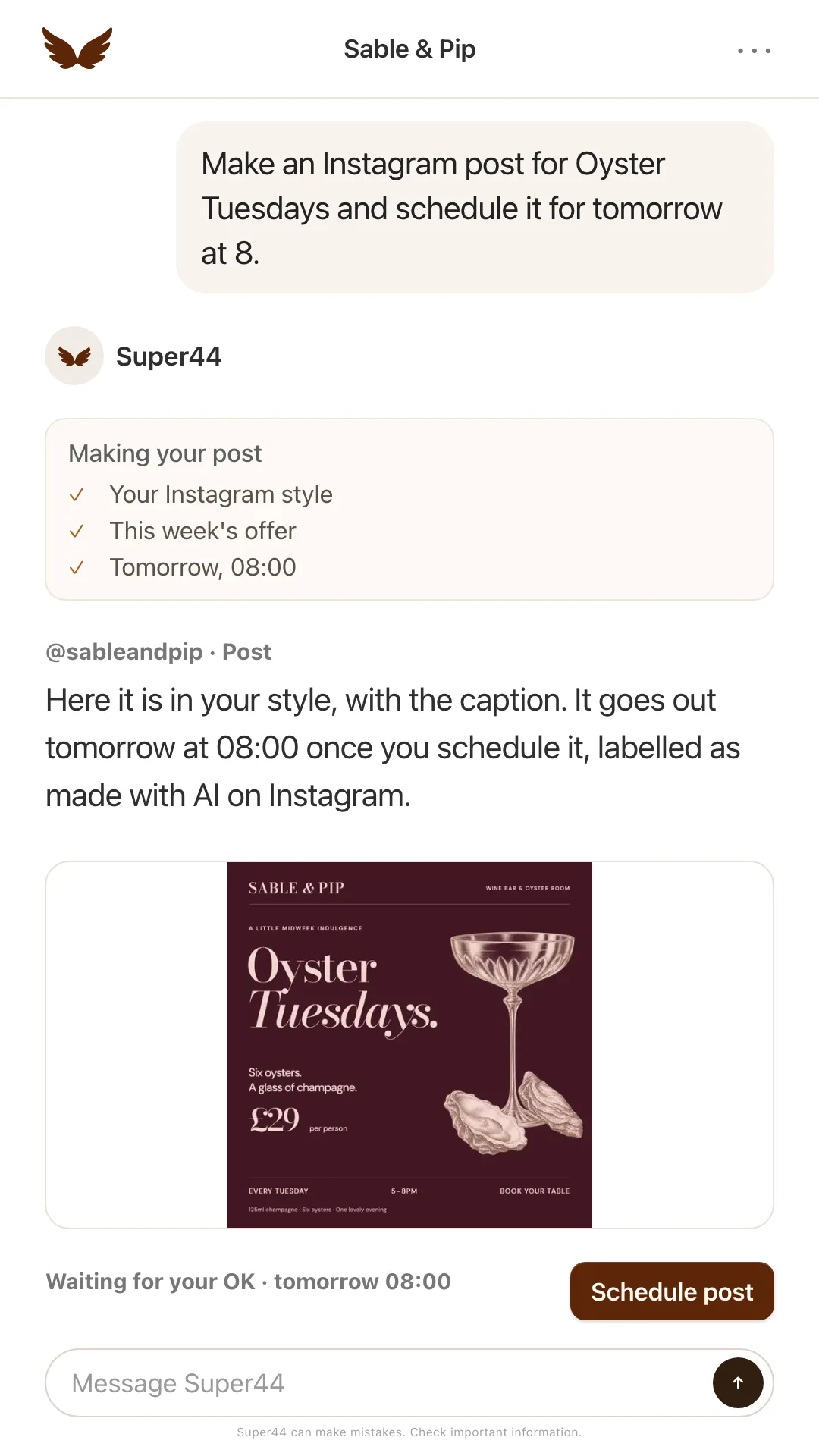
Each Instagram post arrives as a card with the exact picture, caption and time. Approve it and it goes out at that time, up to 30 days ahead. Reels are made from your own photos, and each waits on its card until you approve it. The Google post goes up when you say yes in the chat. The same £19 also drafts your Google review replies in your voice, reads your till each night and drafts your rota, which no scheduler on this list does.
Who should not pick it: an owner who films clips and wants to cut them, since Super44 makes video from photos and does not edit footage you shot. CapCut does. Nor one who wants to design every post by hand, which is Canva's job.
Cost: free to start, with three videos a day of up to 15 seconds and your first Instagram post and first Google post published for you. Core at £19 a month publishes every post after that and makes 10 videos a day.
What the same week costs on each
Take a café posting three Instagram photos, one Reel and one Google post a week, on monthly billing.
| Setup | A month | Who makes the posts | Google post |
|---|---|---|---|
| Canva free + Buffer free | £0 | You | In Buffer's queue |
| Canva free + Meta Business Suite | £0 | You | By hand in your Business Profile |
| Canva Pro + Buffer free | £13 | You, with AI photo edits | In Buffer's queue |
| Later Starter | $25 | You, with AI captions | By hand in your Business Profile |
| Super44 Core | £19 | Super44, you approve | Published for you |
| Predis.ai Core | $32 | Predis.ai, you check | Scheduled from Predis.ai |
If you enjoy the design work, stay on the free rows. If nobody has the time, Super44 makes the posts for £19 a month, against $32 plus tax for Predis.ai.
Which one to pick
For one venue that wants its posts made for it, pick Super44. If you would rather make them yourself, pick by the job below.
- You want posts, Reels and the Google post made from this week's photos, and only want to approve them. Super44: free to start, then Core at £19 a month when you want every post published for you.
- Your photos are already good and you post to Instagram and Facebook. Meta Business Suite, free, with the Google post added in your Business Profile.
- You like designing and have an hour on Sunday. Canva free with Buffer free. Move to Canva Pro at £13 when you want the background remover.
- You film your own video. CapCut, or Instagram's free Edits app if Instagram is your only channel. Leave CapCut's music out of Instagram Reels.
- You post now and then. ChatGPT's free plan for the odd poster or brightened photo, then post it from your phone.
- You run a brand across many channels, TikTok included. Later, from $25 a month in dollars, with your Google update posted by hand.
- You sell products online at volume. Predis.ai, $32 to $79 a month in dollars, with your own photos in every post.
Whichever you choose, fix the light, crop and background and leave the dish alone. What AI can and cannot do to your food photos shows that line on three real dishes. For a worked week of three posts, a Reel and a Google post from five phone photos, see social media for venues with no time. If you are weighing AI beyond social media, the AI tools worth using to run a restaurant compares them on the till, rota and reviews.
Frequently asked questions
What is the best AI tool for restaurant social media?
For a venue that wants the posts made for it, Super44: send this week's photos and it makes the posts, Reels and Google post in your style and publishes each one you approve. It is free to start, with your first Instagram post and first Google post published free, then Core at £19 a month. If you are happy designing, Canva's free plan plus Buffer's free scheduler costs nothing and covers Instagram, Facebook and Google. If you film video, CapCut is the editor.
Can AI make Instagram posts from my own food photos?
Yes. ChatGPT edits a photo you upload and can add text to it, Canva Pro has Magic Edit and a background remover, and Predis.ai and Super44 turn your photos into finished posts and Reels. Keep the food real: fix the light, background and crop, and never add garnish or sides the dish does not come with, because UK advertising rules can apply to a venue's promotional posts on its own Instagram.
Which tools post to Google Business Profile as well as Instagram?
On this list, Buffer, Predis.ai and Super44, and Metricool's free plan connects a Google Business Profile too. Google Business Profile is not on Canva's scheduler list or among Later's supported profiles, and Meta lists the apps Business Suite manages as Facebook, Instagram, Threads and WhatsApp. You can always post free in your Business Profile itself, where Google lets you schedule a post and set it to repeat.
Is a free plan enough for one café?
Often, yes. Buffer's free plan connects three channels with 10 scheduled posts on each, enough for two weeks at four posts a week, and Meta Business Suite schedules Instagram and Facebook for nothing. They leave the making to you, and that is the part Super44 does from your photos, free to start.
Can I use CapCut music in my venue's Instagram Reels?
Not safely. CapCut's Materials License Agreement says its Sounds are for personal, non-commercial video, and that Commercial Sounds may be shared only within CapCut, TikTok and TikTok for Business. Using either on a business Instagram account needs separate permission from the rights holders, so post the Reel without a CapCut track.
Are the dollar prices more than they look?
A little. Buffer, Later and Predis.ai charge in US dollars and add tax on top, so the pound figure moves with the exchange rate. Later's and Predis.ai's lower prices are for a year paid upfront, $225 and $230. Billed monthly they are $25 and $32.
Sources
- Meta Business Help Centre: How Meta Business Suite works — "Meta Business Suite is free to use on desktop and in the Meta Business Suite mobile app." Lists "Schedule, publish and manage posts, stories, reels and more" and "use AI to help you generate content ideas". Manages presence "across Meta technologies, such as Facebook, Instagram, Threads and WhatsApp". Checked 6 November 2026.
- Meta Business Help Centre: Post Facebook and Instagram content from Meta Business Suite — "Creators can publish posts, stories and reels to Facebook and Instagram from Meta Business Suite." Posts go to both by default when the Page and Instagram account are connected. Checked 6 November 2026.
- Meta Business Help Centre: Save, schedule or reschedule posts in Meta Business Suite — Scheduling steps, including the Active times option for choosing when to publish. Checked 6 November 2026.
- Google Business Profile Help: Get started — "With a Business Profile on Google, you can manage how your business shows up on Maps and Search at no charge." Checked 6 November 2026.
- Google Business Profile Help: Create and manage posts — "Posts can show text, photos or videos." Posts can be scheduled with "Schedule this post" and set to publish on a recurring basis. Checked 6 November 2026.
- Canva pricing (UK) — Free £0; Pro £13 a month or £100 a year for one person; Business £18 a month or £180 a year per person. Comparison table: Social Content Planner, Magic Edit, Magic Eraser and Photo Background Remover not included on Free, included on Pro. Templates: 1.6+ million on Free, 3.6+ million on Pro. Brand Kits: 1 on Free, 5 on Pro. Checked 6 November 2026 from the UK.
- Canva Help: Connect to Instagram to schedule posts — "Scheduling posts with the Content Planner is only available to Canva Pro, Canva Teams, and Canva for Nonprofits users." On Stories and Reels: "you can still share Stories and Reels using the Canva mobile apps". On galleries: "You can only schedule single video or image posts." Requires an Instagram Business account linked to a Facebook Page. Checked 6 November 2026.
- Canva Help: Schedule posts on Facebook, Pinterest, and more — Supported platforms: Facebook Pages, Instagram Business Account, X, LinkedIn, Pinterest, Slack, Tumblr. Google Business Profile is not listed. Checked 6 November 2026.
- Canva food Instagram post templates — Food and café Instagram templates "for your restaurant or food blog". Checked 6 November 2026.
- CapCut pricing (UK) — Free GBP 0; Pro GBP 21.99 a month or GBP 199.99 a year, with "1200 monthly AI credits", "All premium templates" and "1 TB of space storage"; Teams GBP 13.49 a month per seat. "Displayed pricing is for reference only. Sign in to see final pricing, taxes, and any applicable offers for your account." No scheduling listed on any plan. Checked 6 November 2026 from the UK.
- CapCut homepage — "CapCut has everything you need to create trending content for YouTube, Instagram, and beyond." AI Video Generator: "Go from words or images to a video in seconds." Auto Captions: "Generate captions, then translate and style them." Checked 6 November 2026.
- CapCut Materials License Agreement — Last updated 22 January 2026. Sounds are for video that is "only for personal entertainment and non-commercial purposes". "Commercial Users may show or share their video that includes a Commercial Sound within CapCut, TikTok and TikTok for Business". Other uses "require you to obtain separate permission". Checked 6 November 2026.
- Edits: Video Editor, by Instagram (Google Play) — Instagram's own listing: "Edits is a free video editor"; "Easily share to Instagram with high-quality playback"; "Bring images to life with AI animation". Listing notes in-app purchases. Checked 6 November 2026.
- ChatGPT pricing (UK) — Free £0 ("Limited image creation"), Go £7 a month, Plus £20 a month, Pro from £89 a month. Checked 6 November 2026 from the UK.
- OpenAI Help Center: Images in ChatGPT — "You can also upload an existing image and describe the changes you want ChatGPT to make." "ChatGPT Images can follow instructions to add text". "ChatGPT Images is available on all tiers." Editor: "edits may extend beyond the area you selected". GIF creation "is rolling out", including animating an uploaded still. Images are saved or shared from Images. Checked 6 November 2026.
- OpenAI Help Center: ChatGPT Free Tier FAQ — "File uploads, image generation, voice, data analysis, and other tools have separate usage limits. ChatGPT will notify you when you reach an applicable limit." No number published. Checked 6 November 2026.
- OpenAI Help Center: What to know about the Sora discontinuation — "The Sora web and app experiences were discontinued on April 26, 2026." Checked 6 November 2026.
- Buffer pricing — Free: "Connect up to 3 channels", "10 scheduled posts per channel - refill anytime", AI Assistant included. Essentials $6 a month per channel billed monthly, or $5 a month per channel ($60) billed yearly. Supported channels include Google Business Profile. VAT: "Buffer applies the local standard Value-Added Tax (VAT) rate for B2C customer located in the United Kingdom." VAT-registered businesses can enter a VAT number. AI Assistant: "Refine and repurpose your content using AI. Unlimited credits." Prices shown in US dollars from the UK, checked 6 November 2026.
- Buffer for Instagram — "You can schedule Instagram image posts, video posts, carousel posts (up to 10 images), stories, and reels with Buffer." Stories can publish automatically. Checked 6 November 2026.
- Later pricing — Free 14-day trial, no free plan. Starter $25.00 a month billed monthly, or $18.75 a month billed yearly; 1 Social Set (8 profiles), 30 posts per profile per month, 5 AI credits a month, Link in Bio, "Instagram, Facebook, & TikTok Best Time to Post". Visual Planner on every plan: "plan out your entire social media schedule across all platforms on one visual calendar". "1 credit generates 3 ideas or 1 caption". "*Prices are billed in USD, applicable taxes are extra". A Social Set "includes one of each profile we support: Instagram, Facebook, TikTok, Pinterest, LinkedIn, YouTube, Threads and Snapchat." Checked 6 November 2026 from the UK.
- Later Instagram auto publish — "Automatically publish Instagram images, carousels, and Reels". Stories: "must be published through Notification Publishing", with "a reminder sent to your phone when it's time to post". Checked 6 November 2026.
- Predis.ai pricing — Core $32 a month billed monthly, or $19 a month ($230) billed yearly, "No Auto Posting", 10 channels, 1,300 credits; Rise $79 a month or $40 a month ($474) billed yearly, with Auto Posting. "Every plan starts with 3 days free. We take a card to start the trial". "All prices are in USD, plus taxes where applicable." Core lists "Publish to 10 channels". Comparison table lists uploading your own assets, post scheduling, Instagram Reels, carousels, Stories scheduling and Google Business Profiles. Checked 6 November 2026 from the UK.
- Predis.ai homepage — "The AI Ad Generator for Video Ads, UGC, & Image Ads". "Set brand colors, tone, and logo once. Predis.ai applies them across every format, in every campaign." Checked 6 November 2026.
- Predis.ai Reel maker — "Type an idea, upload a photo, or paste a product URL. Predis.ai writes the script, builds every scene, and adds a voiceover." "Auto-captions, music, and AI avatars come built in." Checked 6 November 2026.
- Predis.ai scheduling and auto post — Sends posts "to Instagram, Facebook, TikTok, LinkedIn, YouTube Shorts, Pinterest, Google Business, and X." The auto-post page (predis.ai/auto-post/) says content "publishes on schedule, every day, without you logging in." Checked 6 November 2026.
- ASA/CAP: A picture says a thousand words — CAP News, 11 September 2025. Images that exaggerate the quality or size of a product are likely to mislead.
- ASA/CAP: Remit: Own websites — The CAP Code applies to a business's own website and other non-paid-for space online under its control, including its social media.
- Super44 capabilities — Instagram posts, carousels of 2 to 10 images, Reels and Stories, scheduled up to 30 days ahead, each published after the owner approves it; Reels from one photo or two to four in order; Google posts published on approval. Publishing: the first Instagram post and the first Google post on the free plan, then Core or trial. Brand style learned from the venue's Instagram and website. Video: 3 a day of up to 15 seconds on the free plan, 10 on Core. Core £19 a month. As of 6 November 2026.
- Metricool pricing — Free €0 a month: "Manage 1 brand", "Schedule up to 20 posts per month", Google Business Profile among the connections on every plan. Starter from €20 a month billed monthly (€16 billed annually). "The prices indicated do not include any applicable VAT." Shown in euros or dollars from the UK, checked 6 November 2026.