Instagram Captions and Google Posts for Restaurants: 7 ChatGPT Prompts That Work
Seven ChatGPT prompts for a UK restaurant's Instagram captions, Stories, Reels and Google posts, built from your real menu, prices, quiet days and photos. What to paste in, what to check, and the job ChatGPT hands back to you every time.

Alex Riesenkampff
22 November 2026 · 17 min read · Markdown
ChatGPT writes a good Instagram caption or Google post for a restaurant when you give it the facts it can't know: the dish, the price, the dates, your quiet days and the way you talk. Ask for "a post about our lunch" and you get filler. Paste the menu line, the price and three captions you've written before, and you get something you'd post. In a Markel Direct survey of 501 UK small business owners and tradespeople who market on social media, published in July 2026, 54% said they spend one to three hours a week creating social media content. The seven prompts below cut the writing part of that. The posting stays with you.
| Prompt | What you paste in | What you get back | What you still do yourself |
|---|---|---|---|
| House style note | Three captions you've posted, words you never use | A voice every later prompt reuses | Update it when the menu or your tone changes |
| A month's content plan | Menu and prices, dates, quiet times | A dated table of posts, each with the photo it needs | Tell it which dishes sold and which nights were quiet |
| Caption from your dish photo | The photo or a description, one true detail, the price | Three captions and up to five hashtags | Take the photo and post it in Instagram |
| Google post for an offer or event | The offer, the dates, the button | A title, text and dates for Google's form | Paste it into your Google profile and set the dates |
| One photo, three posts | The photo and the offer | A feed caption, Story frames and a Google post | Crop, upload and schedule each one, in two apps |
| A 15-second Reel | The dish or moment, who's filming | A hook, a shot list, on-screen text and a caption | Film the clips and edit them in Instagram |
| Replies to comments | The comments and the facts that answer them | A reply for each, complaints flagged | Paste each reply back under its comment |
Set up your restaurant's voice once
Save one house style note and every prompt after it comes back sounding like your restaurant rather than an advert. ChatGPT's pricing page lists projects on every personal plan, Free included (Free, Go, Plus and Pro), and OpenAI says project instructions apply to every chat inside that project. Create a project called "Posts", paste the note below into its instructions, and you won't paste it again.
House style note for your posts
You write Instagram and Google posts for [restaurant name], a [e.g. "40-cover neighbourhood restaurant"] in [area].
How we talk: [e.g. "warm, dry, a bit cheeky; short sentences; we say 'we', never 'our establishment'"].
Words we never use: [e.g. "mouth-watering, indulge, foodies, elevate, nestled"].
Three captions we have posted that sound like us:
1. [paste]
2. [paste]
3. [paste]
Rules for every post:
- British spelling. One emoji at most.
- Three to five hashtags, specific to us and our area. Never generic ones like #food or #foodie.
- Never invent a dish, price, date, ingredient, award or offer I have not given you. If something is missing, ask me.
- After each draft, list any fact I should check before posting.
Pick three captions you'd be happy to see again, written by whoever knows the food best. A caption that did well because of a great photo teaches ChatGPT less than a plain one that sounds exactly like you. Every prompt below starts with "Use our house style", which works inside the project.
A month of posts planned from your real menu and quiet days
Give ChatGPT your menu, your dates and the times you're quiet, and it lays out a month of posts as a table, each with the photo you need. The plan is only as good as what you tell it about trade, so spend two minutes on the quiet-times line.
A month of posts from your menu
Use our house style. Plan our Instagram and Google posts for [month].
Our menu now, with prices: [paste the dishes you want to sell].
Dates that matter: [e.g. "wine night Thursday 10th, closed 25 and 26 December, Christmas menu from 1 December"].
Our quiet times: [e.g. "Tuesday and Wednesday lunch, early evenings before 7pm"].
What I want more of: [e.g. "weekday set lunch, two courses for £18"].
Photos I have or can take during service: [e.g. "set lunch plates, chef at the pass, the room at 8pm"].
I can post [3] times a week on Instagram and once a week on Google.
Give me a table with one row per post: date, platform (Instagram post, Reel or Story, or Google update, offer or event), the idea in one line, the photo or clip I need, and the goal (fill a quiet slot, sell a dish or announce a date).
Put posts that fill a quiet slot one or two days before it. Flag clashes and anything you need from me.
For a 40-cover neighbourhood restaurant with a weekday set lunch at £18 for two courses, a good first week of December looks like this:
| Date | Platform | Idea | Photo needed | Goal |
|---|---|---|---|---|
| Mon 30 Nov | Instagram post | Two courses for £18, Tuesday to Friday lunch | Both set lunch plates from above | Fill Tuesday and Wednesday lunch |
| Tue 1 Dec | Google offer | Weekday set lunch £18, 1 to 18 December | The same photo | Catch people deciding where to eat |
| Thu 3 Dec | Reel | Friday's lamb leaving the pass | Four short clips during service | Sell the lamb at the weekend |
| Sat 5 Dec | Story | Christmas menu is out, book now | The menu card on a table | Fill December dates |
Check the dates against your own diary before anything gets made. If you want a year of dates to feed into the prompt, the 2027 marketing calendar lists the ones worth a post.
What the plan can't see is your till. A bar in Germany that launched four new dishes sold €576 of them in 13 trading days, and Super44 flagged its highest-margin dish as under-sold. That dish was the one to post about, and only the sales data said so.
A caption from your own dish photo, in your voice
Describe the photo you took, or attach it, add one true detail and the price, and ask for three lengths: you'll post one and keep the others for later in the month. Instagram has been cutting the limit to five hashtags per post and Reel since December 2025, and says fewer, targeted hashtags work better than many generic ones.
Caption from your own dish photo
Use our house style. Write an Instagram caption for this photo: [describe it, e.g. "slow-cooked lamb shoulder with crispy edges, on white beans with salsa verde, shot on the pass under warm light"], or look at the photo I've attached.
One true detail that makes it worth ordering: [e.g. "the lamb is from a farm 20 miles away and cooks for seven hours"].
Price and when it's on: [e.g. "£19, dinner only, until Saturday or until it runs out"].
Give me three versions:
1. Short, under 20 words.
2. The story behind the dish, under 60 words.
3. One that ends on a clear next step, such as booking for Friday.
Then three to five hashtags.
Describe only what is in the photo. Flag any ingredient or claim I haven't confirmed.
Read the drafts against the plate. If ChatGPT adds a garnish, "locally sourced" or "award-winning" that you didn't give it, cut it. For a quick daily special there's a shorter caption prompt in our ChatGPT prompts for restaurants; this one is for the dishes you want to sell all month. Then the manual part: save the photo to your phone, open Instagram, add it, paste the caption, and post or schedule it in the app.
A Google post for an offer or event
Google posts come in three types, updates, offers and events, and a prompt that names the type and the dates gets you text that fits Google's form first time. Google archives posts older than six months unless a date range is set, and says it may remove posts that carry unverified phone numbers, email addresses or social media handles. Use the Call now button for your number instead.
Google's help page sets out what each type needs. An offer requires a title, dates and a time, and gets a "View offer" button. An event needs a title and start and end dates; leave the times out and it shows as lasting 24 hours on those dates. The same page asks you to avoid "text that adds no value and auto-generated or distracting content", which is the best reason to edit what ChatGPT gives you.
Google Business Profile post
Use our house style. Write a Google Business Profile post for [restaurant name].
Post type: [offer / event / update].
What's on: [e.g. "two-course set lunch for £18, Tuesday to Friday, 12 to 3pm"].
Dates and times: [e.g. "1 to 18 December"].
Button I'll add: [Book / Call now / Order online / Learn more].
Give me:
- For an offer or event, a title of 58 characters or fewer with the price or the date in it. An update has no title.
- A description of two to four sentences, under 300 characters: what it is, when, and why to come.
- For an offer or event, the start and end dates and times, ready to type into Google's form.
Do not put a phone number, email address, web address or social media handle in the text.
Write for someone choosing where to eat in the next hour. No keyword lists.
Run the numbers before you post an offer. If the post brings in four extra covers a day at lunch, Tuesday to Friday, that's 16 extra lunches, or £288 of takings a week at £18, including VAT and before the food and staff it costs. If you run a pub, keep alcohol deals off Google: its help page lists alcohol among the regulated industries whose products posts shouldn't feature. What to post on Google and how often goes deeper on each post type.
One photo, three posts: Instagram, a Story and Google
One good photo can carry a feed post, a Story and a Google post, provided each is written for where it's seen. Google says posts about events, deals or specials may be featured on the mobile profiles of single-location food and drink businesses in five countries, the UK included, where they can show in place of reviews; the reviews stay a tap away. That makes the Google version worth the extra minute.
One photo into three posts
Use our house style. I have one photo: [describe it, or look at the photo I've attached].
It's for: [the offer, dish or date, with price and dates].
Turn it into three pieces, each written for where it will be seen:
1. Instagram feed post: a caption under 80 words with the reason to come, then three to five hashtags.
2. Instagram Story: up to three frames, no more than eight words of text on each, the last one saying what to do (e.g. "Book for Friday").
3. Google Business Profile post: the type (update, offer or event), two or three sentences, and a title and dates if it's an offer or event. No phone number, links or handles in the text.
Use the same facts in all three and add none. Tell me where to crop the photo for the feed and for the Story so the food stays in frame.
The writing takes a minute. Then the hand work starts. You save the photo, crop it twice, post the feed version, build the Story with its text frames, open your Google profile, paste the post, set the dates and attach the photo. Call it five minutes an upload and one offer is a quarter of an hour of copying, not counting the writing. Four offers a month is an hour, every month.
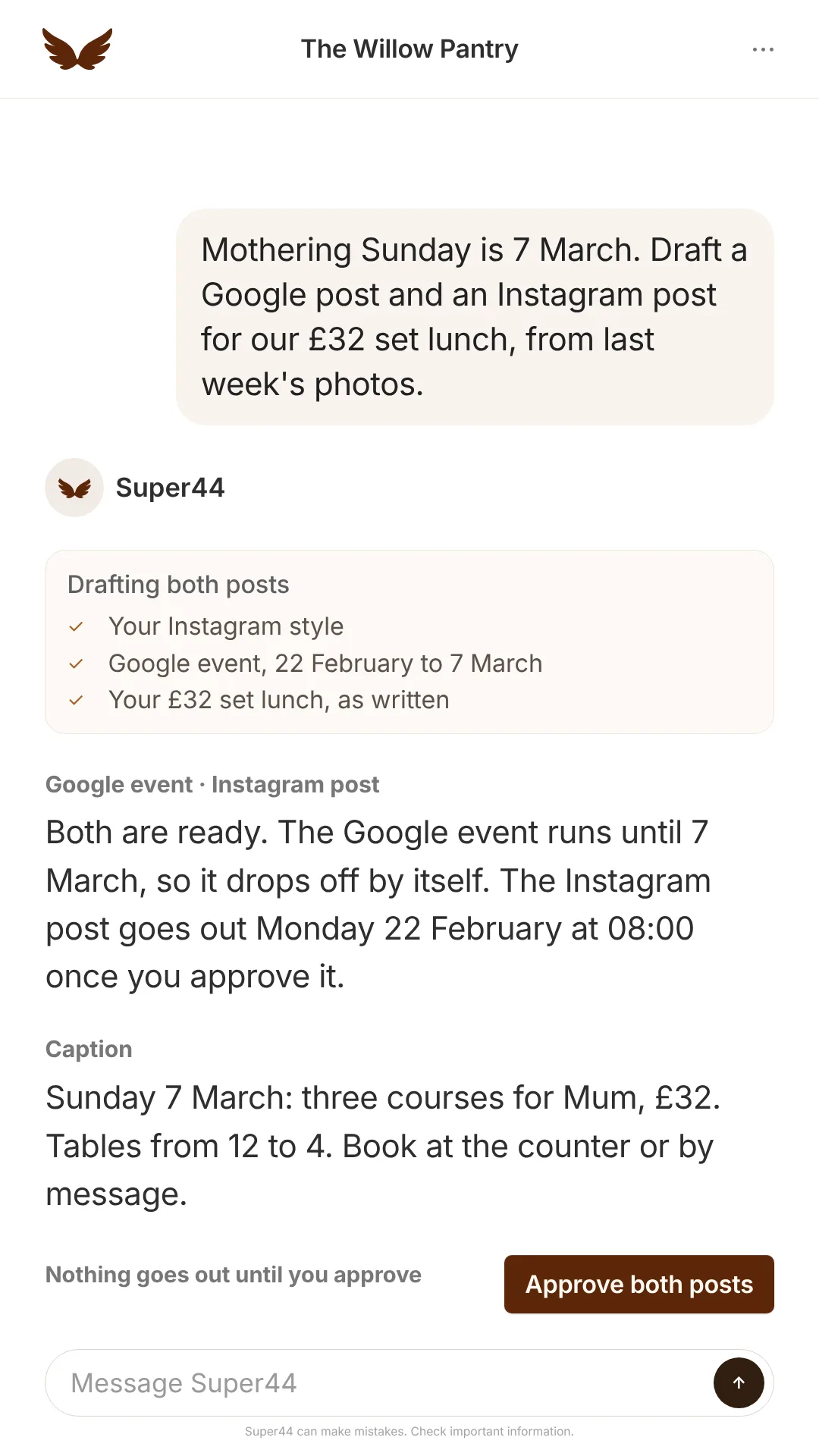
Here is the same week in Super44. On Monday morning you send three photos from Sunday's service and type: "Set lunch is two courses for £18 this week. Make the posts." Super44 makes the Instagram post, a Story, a Facebook post and a Google offer from your own photos, in the style it learned from your Instagram and website. Instagram and Facebook are set for Tuesday at 8am, and the Google offer runs Tuesday to Friday. You approve each one, and Super44 publishes them. Nothing is downloaded, pasted or cropped by hand. If the set lunch runs every week, say so: approve the post once as a weekly series, and it goes out every Tuesday at 8am until you pause it. Skipping a week is one line in the chat. Your first Instagram post and first Google post are free; after that, publishing is on Core at £19 a month.
A 15-second Reel you can film during service
A Reel script that lists four or five clips you'd film anyway on a busy night works better than one that needs a staged shoot, because you'll film it. Instagram has let you record Reels of up to 20 minutes since November 2025 and says those over three minutes won't be recommended to new audiences; 15 seconds is enough to show a dish leaving the pass and a full room.
15-second Reel script and shot list
Use our house style. Write a 15-second Instagram Reel we can film on a phone during service, about [dish, offer or moment, e.g. "Sunday roast leaving the kitchen"].
Who's filming: [e.g. "me, one-handed, between tables"].
What we can't show: [e.g. "guests' faces, the dish pit"].
Give me:
- A shot list of four or five clips, two to four seconds each: where to stand, what to film, in the order they happen on a normal busy night.
- On-screen text for each clip, six words or fewer. The text on the first clip is the hook; the text on the last clip says what to do (book, come in, try it this week).
- A caption under 40 words and three to five hashtags.
Only use moments that happen anyway during service. Show the running time after each clip; the total must be 15 seconds.
A good answer reads like a list you could follow with the phone in one hand: the plate landing on the pass, the gravy going on, the server walking it out, the table from behind. If a shot needs a guest's face, ask them first or leave it out.
Replies to Instagram comments in your voice
Paste in the comments and the facts that answer them, and ChatGPT drafts short replies; complaints and allergy questions you answer yourself. In Markel Direct's survey, 24% of the small business owners and tradespeople asked had experienced backlash on content they posted, and 25% had removed content after criticism. A considered reply matters more than a fast one.
Replies to Instagram comments
Use our house style. Draft replies to these comments on our Instagram post about [what the post was]:
[paste each comment with the person's first name or handle]
Facts you can use: [opening times, how to book, dietary options, prices].
For each comment, write one reply under 25 words that sounds like the person who'd answer at the counter. Answer the actual question. If the answer isn't in the facts above, write [CHECK] instead of guessing.
For a complaint, an allergy question or anything about a bad visit, don't draft a public answer: write one line inviting them to message us, and flag it for me.
No two replies alike, and no "Thanks for the love!" on every one.
Say a guest asks under your Sunday post whether the roast comes in a veggie version. If your facts say "nut roast with all the trimmings, every Sunday", the draft tells them that and how to book; if they don't, you get [CHECK] instead of a made-up dish.
Check every draft, and never post an AI picture of a dish
Whatever writes the words, the post goes out under your name, so read it for dates, prices and names, and only post photos of food you serve. Helen Howe knows what one unchecked post costs. She and her husband, chef Jon Howe, opened Lumière in Cheltenham in 2009 and hold a Michelin star, and this year another Cheltenham restaurant's AI tool published a blog post saying Lumière had closed. Speaking to The Staff Canteen in May 2026, she said:
Small independents, we work so hard to build the trust of our customers and just one unchecked post can undermine years of work and just cost so much time to resolve it.
Pictures need the same care. ChatGPT will draw a plate of food if you ask, and it will look like food, not like yours. In a study published in Scientific Reports in August 2026, 87 people rated 60 pairs of real and AI-generated food pictures, and the AI ones were "rated as significantly less realistic and elicited lower willingness to eat". A guest who orders the dish they saw on Instagram expects that dish.
UK advertising rules point the same way. Since 2011 the CAP Code has covered some of the content on a business's own social media channels. The ASA says its existing rules "apply regardless of how content is generated, edited, or targeted", and that images giving an inaccurate impression of the product a customer will receive are likely to mislead. Brightening a dark photo of the real plate is fine; AI food photos for your menu and Instagram shows where editing stops and inventing starts. Keep obvious illustrations, a cartoon for quiz night or a poster, for things that aren't dishes.
When to stop doing it by hand
Start with the prompts: they're free, the house style note takes ten minutes, and a week of drafts takes one sitting. Three Instagram posts and one Google post a week is 16 posts in a four-week month, each to crop, paste and schedule by hand.
- Start with the style note and the month plan. Most weak captions come from missing facts, and these two fix that.
- Stay with copy and paste if you post once or twice a week and enjoy it. ChatGPT's free plan covers the writing.
- Hand the posting over when the uploading, cropping and scheduling is what eats your hour, or when weeks go by with nothing posted. That's the job Super44 does from your own photos, with your approval on each post. If you're weighing other tools, our comparison of AI social media tools for restaurants prices the alternatives.
- Give the offer a home. If you have no website, Super44 builds one in the chat from your Google photos and your logo, with call, directions and booking buttons, and puts this month's set lunch on it with its dates. You see the preview first and publish it with a tap. Whether a site still earns its place next to your Google profile is answered in restaurant website vs Google profile.
- Keep some things personal. Complaints, allergy questions and anything that names another business get your own words, whichever tool drafted the rest.
- Change course if posts get nothing back. Try a better photo before a cleverer caption: the plate under good light, taken during a real service.
Frequently asked questions
What ChatGPT prompt writes a good Instagram caption for a restaurant?
One that gives ChatGPT the dish, one true detail that makes it worth ordering, the price and dates, and three captions you have already posted, so the draft sounds like you. Ask for three versions under 60 words, one ending on a next step such as booking for Friday, plus three to five specific hashtags: Instagram has been cutting the limit to five per post since December 2025.
Can ChatGPT post to Instagram or my Google Business Profile for me?
Not on its own. ChatGPT writes the caption and the Google post, and can make an image, but you open Instagram and your Google profile and paste, upload and schedule each post yourself. Super44 publishes and schedules Instagram posts, Reels and Stories, Facebook posts and Google posts made from your own photos once you approve each one.
Can Super44 manage my restaurant's Google Business Profile?
Yes, once you connect your own Google login. It publishes and schedules Google posts, including one post repeated every week, replies to reviews in your voice, and updates your opening hours, holiday hours, description, categories and photos. Each change goes out once you approve it.
How do I get ChatGPT to write in my restaurant's voice?
Give it three captions you have already posted, the words you never use and your house rules, and save that note as a project's instructions so every chat in the project starts from it. ChatGPT's pricing page lists projects on every personal plan, Free included.
Is it OK to post AI-generated pictures of my food?
Not as pictures of dishes you serve. The ASA says its rules apply however content is generated, and images that give an inaccurate impression of what a guest will receive are likely to mislead. In a 2026 Scientific Reports study, AI food pictures were also rated less realistic than real photos, and people were less willing to eat what they showed. Edit your own photos for light and crop instead.
Should I let ChatGPT reply to comments on my restaurant's Instagram?
Let it draft replies to questions and compliments, then read each one before posting it. Answer complaints, allergy questions and anything about a bad visit yourself, ideally by inviting the guest to message you. Markel Direct found 24% of UK small business owners and tradespeople had faced backlash on their posts, and a reply is itself a public post: a careless one can draw the same backlash.
Sources
- Markel Direct: How small businesses are using social media in the UK — Published 23 July 2026. Censuswide survey of 501 UK tradespeople and small business owners who use social media to market their business: 76% spend time every week creating or editing content, 54% spend one to three hours a week; 24% have experienced backlash on their content and 25% have removed content after criticism. Not hospitality-specific.
- Social Media Today: Instagram implements new limits on hashtag use — Published 18 December 2025. Quotes Instagram: it will gradually update the number of hashtags in a caption for a Reel or post to five, and fewer, more targeted hashtags can improve performance.
- Social Media Today: Instagram updates Reels camera with improved functions — Published 23 November 2025. 20-minute recording now available in the Reels camera; Instagram has said it will only recommend Reels under three minutes long.
- Instagram: Reels — You can record and edit videos of up to 20 minutes with Reels; Reels over three minutes won't be recommended to new audiences. Checked 22 November 2026.
- TechCrunch: Instagram rolls out an in-app scheduling tool to all professional accounts — Published 8 November 2022. Businesses and creators can schedule posts, Reels and carousels in the Instagram app.
- Google Business Profile Help: Create and manage posts on your Business Profile — Updates, offers and events; offers need a title, dates and time and get a View offer button; events without times show as lasting 24 hours; posts older than six months archived unless a date range is set; featured posts for single-location food and drink businesses in the US, UK, Canada, Australia and New Zealand; scheduling and Repeats; alcohol as a regulated industry; the tip to avoid auto-generated or distracting content. Checked 22 November 2026.
- Google Business Profile Help: Business Profile photos, videos and posts content policy — Posts with unverified contact information, including phone numbers, email addresses and social media handles, may be removed; the Call now button as the alternative. Checked 22 November 2026.
- ChatGPT pricing — Projects listed on all four personal plans: Free, Go, Plus and Pro; Free has limited uploads and limited image creation. Checked 22 November 2026.
- OpenAI Help Center: Projects in ChatGPT — Project instructions apply only within that project and override global custom instructions; chats moved into a project inherit its instructions. Checked 22 November 2026.
- Diel et al., Scientific Reports: AI-generated food stimuli match real counterparts in perceived healthiness and calorie content but not in realism or willingness to eat — Published 15 August 2026. 87 participants rated 60 pairs of AI-generated and real food images; AI images rated significantly less realistic and elicited lower willingness to eat.
- ASA/CAP: A picture says a thousand words. Avoiding misleading imagery in ads — Published 11 September 2025. Images giving an inaccurate impression of the product consumers will receive, including extras or exaggerated quality or size, are likely to mislead; the plate of stew, potatoes and rice example.
- ASA/CAP: Disclosure of AI in advertising — Published 29 May 2025. No AI-specific rules in the CAP and BCAP Codes; existing rules apply regardless of how content is generated, edited or targeted.
- ASA/CAP: Remit, social media — Since 2011 the CAP Code has covered some of the content on a company's own social media channels.
- The Staff Canteen: Lumière owner warns hospitality over AI risks — Published 11 May 2026. Helen Howe, who runs Michelin-starred Lumière in Cheltenham with her husband, chef Jon Howe, on an AI-written blog post on another Cheltenham restaurant's website that wrongly said Lumière had closed.
- Super44 plans — Starter free; Core £19 a month; Plus £49 a month. Checked 22 November 2026.